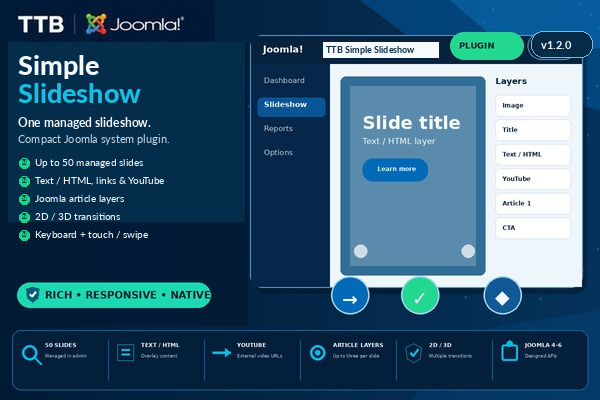
Joomla Slideshow Plugin
TTB Simple Slideshow
☆☆☆☆☆Be the first verified buyer to review this productLightweight single-slideshow plugin with visible manual placement, tooltips, images, overlays, YouTube, Joomla article layers and responsive 2D/3D transitions.
1 year of free updates includedLifetime use of downloaded software. New releases remain available during the included update period.
Overview
TTB Simple Slideshow is the compact option for a Joomla site that needs one managed slideshow without a separate component. Slides are configured directly in the System plugin and rendered only into the frontend host selected by the administrator. The settings page shows the exact host HTML to copy, and an optional legacy fallback can reuse an existing #slideshow area when that compatibility mode is deliberately enabled.
What it does
- Add, remove and reorder up to 50 slides from Joomla administration.
- Select an image for every slide through Joomla Media Manager.
- Add a title directly over the slide image.
- Add text or administrator-controlled HTML content over the image.
- Place the text panel in nine positions: top left, top center, top right, center left, center, center right, bottom left, bottom center or bottom right.
- Control the text-panel width per slide.
- Choose a text-layer animation per slide.
- Add a link or call-to-action button with custom button text.
- Open slide links in the current window or in a new window.
- Add a YouTube URL to a slide.
- Attach up to three Joomla articles to each slide as additional content layers.
- Use one global transition or choose a different transition for each slide.
- Includes Fade and Soft Slide transitions.
- Includes 3D Flip, 3D Cube, 3D Turn and 3D Depth Zoom transitions.
- Configure autoplay, slide delay and transition duration.
- Use a fixed responsive height or a responsive aspect-ratio layout.
- Choose Cover or Contain image fitting.
- Show or hide navigation arrows.
- Show or hide navigation dots.
- Pause autoplay on hover or keyboard focus.
- Navigate with the keyboard.
- Navigate on touch devices with swipe gestures.
- Use a subtle Joomla 4/5/6-style control treatment without changing slide content.
- Respect the browser prefers-reduced-motion setting.
- Import compatible legacy v3Mod slideshow images, text, links, YouTube URLs, article references, delay and 2D/3D preference once, only when no managed slides exist; configured slides are never overwritten.
- Use native JavaScript and no jQuery, MooTools or external slideshow runtime.
- Includes 10 language packs for administrator text and localized frontend accessibility labels: EN, RO, DE, FR, ES, IT, PT, NL, PL, TR.
- Includes contextual administrator tooltips and a compact settings/slides layout.
Placement
The Slideshow settings tab displays the exact HTML host to add:
Keep Slideshow host set to #ttb-simple-slideshow for manual placement. If Legacy #slideshow fallback is deliberately enabled, the plugin can instead create its host inside an existing #slideshow area for compatibility.
Installation
- Upload TTB-Simple-Slideshow-v1.2.2.zip in Joomla Administrator > System > Install > Extensions.
- Open System > Manage > Plugins and enable System - TTB Simple Slideshow.
- Open Slideshow settings and review the placement host.
- Configure the slideshow and add slides in the Slides tab.
- Use manual placement or intentionally enable the legacy #slideshow fallback.
- Test desktop, keyboard and touch/swipe behaviour on the target template.
Requirements
- Joomla 4.x/5.x architecture; Joomla 6 is an intended compatibility target pending dedicated live runtime validation.
- Joomla Media Manager for normal image selection.
- Joomla Content only when article layers are used.
- JavaScript enabled in the visitor browser.
Important
TTB Simple Slideshow intentionally manages one slideshow configuration. For multiple reusable slideshows with a central component and native module placement, use TTB Slideshow Manager. Legacy import and #slideshow fallback are compatibility conveniences and do not modify the old template slideshow data.
Updates and delivery
The purchase includes one year of free updates and protected account downloads. The installed software continues to run after the update period.
License
Enter the product key from My Library in the plugin License field. Missing or invalid keys do not disable the slideshow, but may display Powered by tictacbazar.com. License checks are cached and temporary API outages do not disable the extension.
- 1 year of free updates
- Lifetime software use
- Account-bound downloads
- 10 protected downloads per product
Login is required only when you continue to Stripe.
Related guides
Ratings & Reviews
Only customers with a paid order for this product can submit a rating.
Login with the account used for your purchase to rate it.
Login